
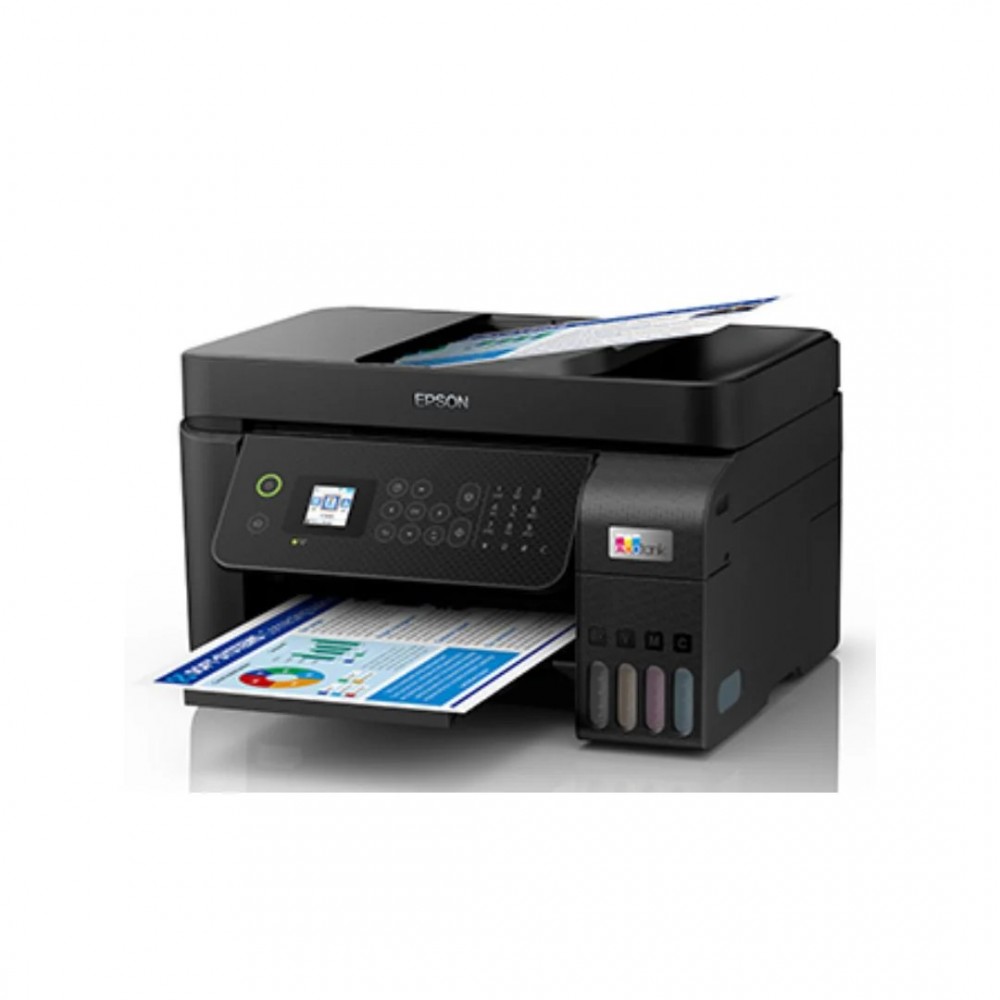
Epson EcoTank L5290 A4 Wi-Fi All-in-One Ink Tank Printer with ADF

Product Description
Epson EcoTank L5290 A4 Wi-Fi All-in-One Ink Tank Printer with ADF brings print, scan, and copy functions into one practical Epson printer setup for everyday office and home productivity. At DigiHome, we present it for users who need flexible paper handling, wired and wireless connectivity, and reliable document output in a compact all-in-one design.
Key Features:
- Epson all-in-one printer with Print, Scan, and Copy functions for daily document tasks
- Laser Printer type with up to 36 pages/minute for Letter size and up to 34 pages/minute for A4 size
- Supports A4, Letter, A5, A5 Long Edge, A6, Executive, Legal, Folio, Mexico Legal, and India Folio paper sizes
- Print resolution options include 600 x 600 dpi, HQ1200 2400 x 600 dpi quality, and 1200 x 1200 dpi
- Automatic 2-sided printing support for A4 using Plain Paper, Thin Paper, and Recycled Paper
- Paper Tray #1 supports Plain Paper, Thin Paper, Recycled Paper, and Thick Paper, with up to 250 sheets of 80 g/m2 plain paper
- Multi-purpose tray supports 1 sheet for quick single-page media handling
- Output tray holds up to 120 sheets of 80 g/m2 plain paper with face-down delivery
- Copy functions include monochrome copying, sorting, stacking up to 99 pages, and 25% to 400% enlarge/reduce in 1% increments
- Colour and monochrome scanning supported, with scanner glass resolution up to 1200 x 1200 dpi and ADF resolution up to 600 x 600 dpi
- Connectivity includes USB 2.0, 10BASE-T / 100BASE-TX LAN, IEEE 802.11b/g/n wireless LAN, and IEEE 802.11g/n Wi-Fi Direct
- Compatible with Windows, Mac OS X, and Linux operating environments listed in the specifications
Specifications:
Brand / Supplier: Epson
Tags: Epson, epson printer, Ink Tank Printer, PRINTERS & SUPPLIES
Functions: Print, Scan, Copy
Printer Type: Laser Printer
Product Dimensions: 410 mm x 398.5 mm x 318.5 mm
Print Speed: Up to 36 pages/minute Letter size; up to 34 pages/minute A4 size
Paper Size: A4, Letter, A5, A5(Long Edge), A6, Executive, Legal, Folio, Mexico Legal, India Folio
Print Resolution: 600 x 600 dpi; HQ1200 2400 x 600 dpi quality; 1200 x 1200 dpi
2-Sided Print Paper Type: Plain Paper, Thin Paper, Recycled Paper
2-Sided Print Paper Size: A4
Paper Input Tray #1 Paper Type: Plain Paper, Thin Paper, Recycled Paper, Thick Paper
Paper Input Tray #1 Maximum Capacity: Up to 250 sheets of 80 g/m2 plain paper
Paper Input Multi-Purpose Tray: 1 sheet
Paper Output: Up to 120 sheets of 80 g/m2 plain paper, face-down delivery to the face-down output paper tray
Copy Monochrome: Yes
Multiple Copies: Sorts - Yes; stacks up to 99 pages
Copy Enlarge / Reduce: 25% to 400%, in increments of 1%
Copy Resolution: Up to 600 x 600 dpi
2-Sided Copy Paper Type: Plain Paper, Thin Paper, Recycled Paper
2-Sided Copy Paper Size: A4
USB: USB 2.0
LAN: 10BASE-T / 100BASE-TX
Wireless LAN: IEEE 802.11b/g/n Infrastructure/Ad-hoc Mode; IEEE 802.11g/n Wi-Fi Direct
Colour Scanning: Yes
Scan Monochrome: Yes
Colour Depth Input: 30 bit colour Processing
Colour Depth Output: 24 bit colour Processing
Greyscale Input: 10 bit colour Processing
Greyscale Output: 8 bit colour Processing
Scan Resolution Interpolated: Up to 19200 × 19200 dpi
Scanner Glass Resolution: Max 1200 x 1200 dpi
ADF Resolution: Max. 600 x 600 dpi
Display: 16 characters × 2 lines
Memory Capacity: 256 MB
Weight: 11.8 kg
Power Source: 220 - 240 V AC 50/60 Hz
Power Consumption Printing: Average approx. 475W
Power Consumption Ready: Average approx. 42W
Power Consumption Sleep: Average approx. 6.2W
Power Consumption Power Off: Approx. 0.03W
Noise Level: LpAm = 49 dB(A)
Windows Operating System: Windows 7 SP1, 8, 8.1, 10, Server 2008 Network only, Server 2008 R2 Network only, Server 2012 Network only, Server 2012 R2 Network only, 10, Server 2016 Network only
Mac Operating System: OS X v10.10.5, 10.11.x, 10.12.x Download only
Linux Operating System: CUPS, LPD/LPRng x86/x64 environment
Order from DigiHome with fast shipping and friendly local support.
When you order from opencartworks.com, you will receive a confirmation email. Once your order is shipped, you will be emailed the tracking information for your order's shipment. You can choose your preferred shipping method on the Order Information page during the checkout process.
The total time it takes to receive your order is shown below:

The total delivery time is calculated from the time your order is placed until the time it is delivered to you. Total delivery time is broken down into processing time and shipping time.
Processing time: The time it takes to prepare your item(s) to ship from our warehouse. This includes preparing your items, performing quality checks, and packing for shipment.
Shipping time: The time for your item(s) to tarvel from our warehouse to your destination.
Shipping from your local warehouse is significantly faster. Some charges may apply.
In addition, the transit time depends on where you're located and where your package comes from. If you want to know more information, please contact the customer service. We will settle your problem as soon as possible. Enjoy shopping!
