
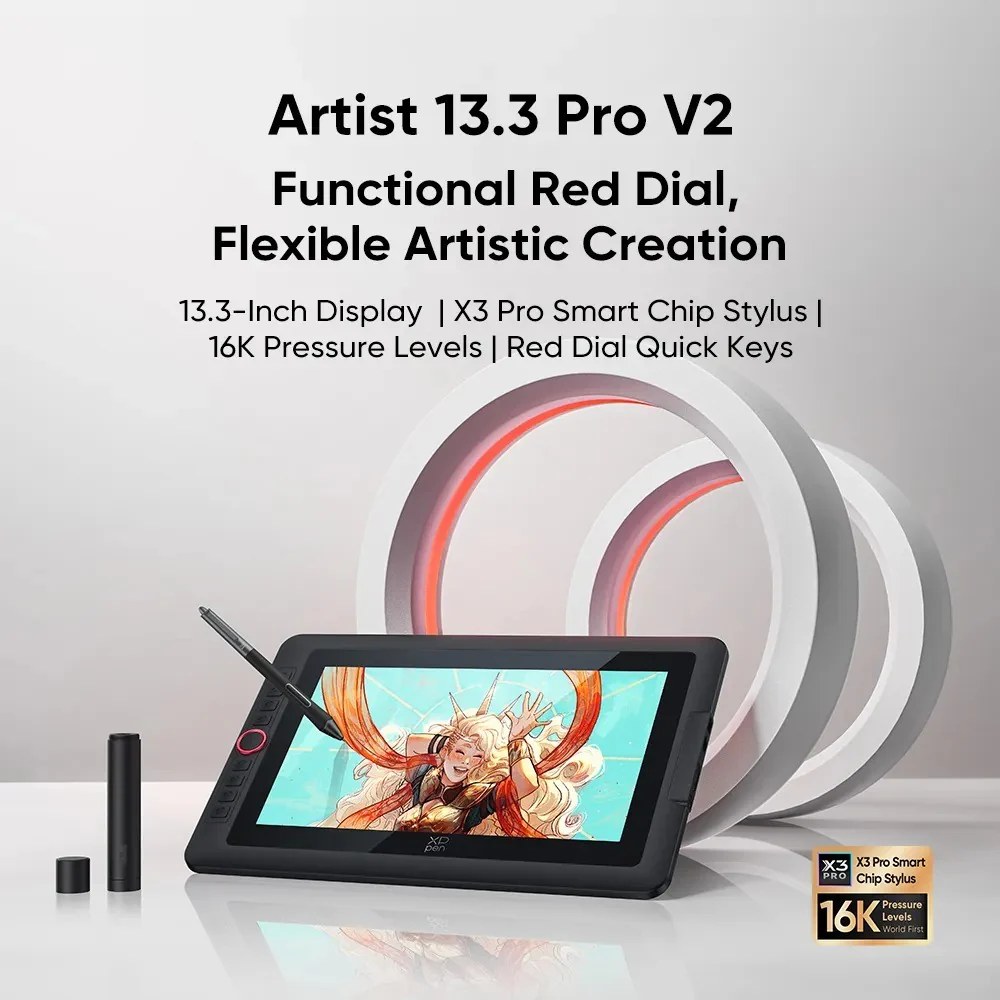
XP-Pen Artist 13.3 Pro V2 |16 Pro Gen 2 (16k)| 19 Pro Gen 2 | Pro 22 2nd Gen | Pro 24| Student & Designer Drawing Tablet


Product Description
XP-Pen Artist drawing tablets give students, designers, and digital creators a precise screen-based workspace for sketching, illustration, editing, and creative production. At DigiHome Malaysia, choose from XP-Pen Artist 13.3 Pro V2, Artist 16 Pro Gen 2, Artist 19 Pro Gen 2, Artist Pro 22 2nd Gen, and Artist Pro 24 to match your preferred canvas size and workflow.
Key Features:
- XP-Pen drawing display range designed for student creators, graphic designers, illustrators, and digital art users
- Multiple Artist Pro models available, from compact 13.3-inch style workspaces to larger professional display options
- Full lamination supported on Artist 13.3 Pro V2 Drawing Display, Artist 16 Pro Gen 2 (16k), Artist 19 Pro Gen 2, and Artist Pro 22 2nd Gen
- 178° viewing angle for a clear creative view from different positions
- 60° tilt support for more natural pen handling
- High pen resolution of 5080LPI across the range
- Broad system compatibility including Windows, macOS, Android, ChromeOS, and Linux depending on model
- This product now fully supports macOS Monterey and Windows 11
Specifications:
- Brand / Supplier: XP-Pen
- Tags: GADGET ACCESSORIES, XPPEN
- Model: Artist 13.3 Pro V2, Artist 16 Pro Gen 2, Artist 19 Pro Gen 2, Artist Pro 22 2nd Ge, Artist Pro 24
Product Name:
- 13.3 Pro V2 Drawing Display
- 16 Pro Gen 2 (16k)
- 19 Pro Gen 2
- Pro 22 2nd Gen
- Pro 24
Product Model:
- 13.3 Pro V2 Drawing Display: MD130FH
- 16 Pro Gen 2 (16k): MD160QH
- 19 Pro Gen 2: MD180UH
- Pro 22 2nd Gen: MD220QH
- Pro 24: not specified in provided information
Color:
- 13.3 Pro V2 Drawing Display: Balck
- 16 Pro Gen 2 (16k): Black
- 19 Pro Gen 2: Grey
- Pro 22 2nd Gen: Black
- Pro 24: Black
Dimensions:
- 13.3 Pro V2 Drawing Display: 390.4 x 249.98 x 12.9 mm
- 16 Pro Gen 2 (16k): 405.11 X 291.37 X 20.23 mm
- 19 Pro Gen 2: 460 x 306.6 x 21.5mm
- Pro 22 2nd Gen: 547.0 x 362.0 x 33.4 mm
- Pro 24: 632 x 370 x 44.8mm
Work Area:
- Artist 13.3 Pro V2 Drawing Display: 294.76*166.24 mm
- Artist 16 Pro Gen 2 (16k): 344.68 X 215.42 mm
- Artist 19 Pro Gen 2: 409 x 230mm
- Artist Pro 22 2nd Gen: 475.392 x 267.408 mm
- Artist Pro 24: not specified in provided information
Net Weight:
- Artist 13.3 Pro V2 Drawing Display: 1.139 kg(Stand Not Included)
- Artist 19 Pro Gen 2: 2.23kg
- Artist Pro 24: 5.55 kg (Stand Included)
Display Resolution:
- 13.3 Pro V2 Drawing Display: 1920*1080
- 16 Pro Gen 2 (16k): 2560*1600
- 19 Pro Gen 2: 3840 x 2160 (16:9)
- Pro 22 2nd Gen: 2560 x 1440
- Pro 24: 2560 x 1440
Color Gamut Coverage Ratio (typical):
- 13.3 Pro V2 Drawing Display: 99% sRGB, 89% Adobe RGB, 95% Display P3
- 16 Pro Gen 2 (16k): 99% sRGB, 97% Adobe RGB, 99% DCI-P3
- 19 Pro Gen 2: 99.8% sRGB, 96% Adobe RGB, 98% Display P3
- Pro 22 2nd Gen: 99% sRGB, 99% Adobe RGB, 94% Display P3
- Pro 24: 90% Adobe® RGB
Display Color:
- 13.3 Pro V2 Drawing Display: 16.7 Million
- 19 Pro Gen 2: 1.07B (8bit+FRC)
- Pro 22 2nd Gen: 16.7 Million
Full Lamination:
- Artist 13.3 Pro V2 Drawing Display: Yes
- Artist 16 Pro Gen 2 (16k): Yes
- Artist 19 Pro Gen 2: Yes
- Artist Pro 22 2nd Gen: Yes
Viewing Angle:
- 178°
Brightness (typical):
- 250 cd/m2
Stylus:
- Artist 13.3 Pro V2 Drawing Display: X3 Pro Smart Chip Stylus
- Artist 16 Pro Gen 2 (16k): X3 Pro Smart Chip Stylus
- Artist 19 Pro Gen 2: X3 Pro Roller Stylus + X3 Pro Slim Stylus
- Artist Pro 22 2nd Gen: X3 Pro Smart Chip Stylus
- Artist Pro 24: Battery-free
Pressure Levels:
- Artist 13.3 Pro V2 Drawing Display: 16384
- Artist 16 Pro Gen 2 (16k): 16384
- Artist 19 Pro Gen 2: 16384
- Artist Pro 22 2nd Gen: 16384
- Artist Pro 24: 8192
Tilt:
- 60°
Initial Activation Force:
- Artist 13.3 Pro V2 Drawing Display: 3g
- Artist 16 Pro Gen 2 (16k): 3g
- Artist 19 Pro Gen 2: 3g
- Artist Pro 22 2nd Gen: 3g
Accuracy:
- Artist 13.3 Pro V2 Drawing Display: ±0.4 mm (center)
- Artist 16 Pro Gen 2 (16k): ±0.4 mm (center), ±0.8 mm (corner)
- Artist 19 Pro Gen 2: ±0.4 mm (center), ±0.8 mm (corner)
- Artist Pro 22 2nd Gen: ±0.4 mm (center)
- Artist Pro 24: ±0.01 inch (center)
Reading Height:
- Artist 13.3 Pro V2 Drawing Display: 10mm (center)
- Artist 16 Pro Gen 2 (16k): 10mm (center)
- Artist 19 Pro Gen 2: 10mm (center)
- Artist Pro 22 2nd Gen: 10mm (center)
- Artist Pro 24: 10 mm
Resolution:
- 5080LPI
Report Rate:
- Artist 13.3 Pro V2 Drawing Display: ≥200RPS
- Artist 16 Pro Gen 2 (16k): 200 RPS (max)
- Artist 19 Pro Gen 2: ≥220RPS
- Artist Pro 22 2nd Gen: ≥220RPS
- Artist Pro 24: 220RPS (max)
Port:
- Artist 13.3 Pro V2 Drawing Display: USB-C
- Artist 16 Pro Gen 2 (16k): 1 x Full-featured USB-C | 1 x 3-in-1 USB-C
- Artist 19 Pro Gen 2: 2 x Full-featured USB-C
- Artist Pro 22 2nd Gen: USB-C, HDMI
- Artist Pro 24: 1 x USB-C port, 2 x USB Hub, 1 x HDMI port, 1 x DC port
Power Input:
- 13.3 Pro V2 Drawing Display: 5V⎓2A
- 16 Pro Gen 2 (16k): AC 110-240V
- 19 Pro Gen 2: AC 110-240V
- Pro 22 2nd Gen: AC 100-240V
- Pro 24: AC 100-240V
Compatibility:
- Artist 13.3 Pro V2 Drawing Display: Windows 7 (or later), macOS 10.13 (or later), Android (USB3.1 DP1.2), ChromeOS 88 (or later), Linux
- Artist 16 Pro Gen 2 (16k): Windows 7 (or later), macOS 10.10 (or later), Android (USB3.1 DP1.2), Chrome OS 88 (or later), Linux.
- Artist 19 Pro Gen 2: Windows 7 (or later), macOS 10.13 (or later), Android (USB3.1 DP1.2), Chrome OS 88 (or later), Linux.
- Artist Pro 22 2nd Gen: Windows 7 (or later), macOS 10.13 (or later), Android 10.0 (or later), ChromeOS 88 (or later), Linux
- Artist Pro 24: Windows 7 (or later), Chrome OS 88 (or later), Linux (Detailed versions) and Mac OS X 10.10 (or later)
DigiHome provides fast shipping and friendly local support.
When you order from opencartworks.com, you will receive a confirmation email. Once your order is shipped, you will be emailed the tracking information for your order's shipment. You can choose your preferred shipping method on the Order Information page during the checkout process.
The total time it takes to receive your order is shown below:

The total delivery time is calculated from the time your order is placed until the time it is delivered to you. Total delivery time is broken down into processing time and shipping time.
Processing time: The time it takes to prepare your item(s) to ship from our warehouse. This includes preparing your items, performing quality checks, and packing for shipment.
Shipping time: The time for your item(s) to tarvel from our warehouse to your destination.
Shipping from your local warehouse is significantly faster. Some charges may apply.
In addition, the transit time depends on where you're located and where your package comes from. If you want to know more information, please contact the customer service. We will settle your problem as soon as possible. Enjoy shopping!
